Poker night should feel like being part of the game, not spending the evening managing spreadsheets, seating charts and a blind timer. TableAce poker tournament management software brings player invitations, tournament setup, seating, the clock and results together so hosts can spend less time chasing details and more time at the table.
Built by a poker player for poker players, TableAce is designed for home games, recurring weekly tournaments and smaller poker clubs. Hosts can run their tournament from a phone or computer while players follow the action on a separate TV display.
What TableAce Poker Tournament Management Software Can Do
Whether you’re gathering your regular group or organizing a club tournament, TableAce helps you:
Instead of managing every detail by hand, hosts can use poker tournament management tools to keep preparations and game-night information organized in one place.
- Invite players and track their responses.
- Set blinds, starting chips, buy-ins, rebuys and payouts.
- Assign seats and manage table moves.
- Display the tournament clock and game information on a TV.
- Record finishing places and results for players to revisit.
TableAce runs in a browser, keeping the host controls and player views within reach on compatible phones and computers. The host stays in control of the tournament without having to stand beside the TV or keep checking a separate clock.
Invite Players and Prepare Before Poker Night
Organizing a tournament starts with knowing who is coming. TableAce helps hosts share tournament invitations, track registrations and check players in as they arrive. Hosts can also add guests themselves, making it practical for groups where not everyone wants a player account.
Before the first hand, set the starting chips, blind levels, breaks, rebuy and add-on rules, and payout structure. Having these details ready means fewer interruptions once everyone sits down. For a step-by-step preparation plan, see our home poker tournament host checklist.
Organize Seating and Balance Multiple Tables
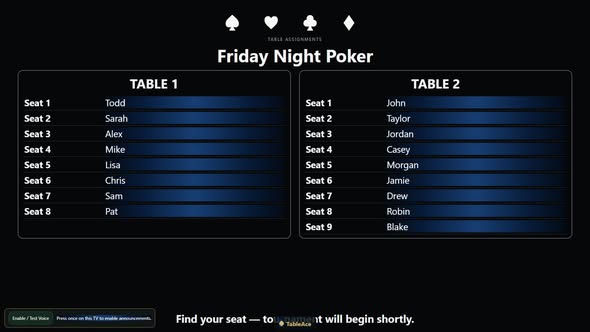
Seating can become one of the trickiest parts of a multi-table game. TableAce helps assign players to tables and seats and manage moves as players are eliminated. That gives the host a clearer view of where everyone belongs and makes it easier to keep tables balanced as the field shrinks.
Put the Tournament Clock and Stats on the TV
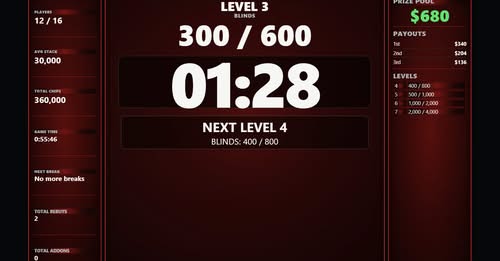
Players should not have to ask what the current blinds are or how much time remains. TableAce offers a dedicated TV view that displays the tournament clock, blind information and game statistics where everyone can see them. The host can manage the tournament from a phone instead of staying at the screen.
Track Rebuys, Results and Tournament History
As the tournament progresses, hosts can record rebuys, add-ons and player eliminations. When the game ends, finishing places and payouts can be recorded for future reference. This is especially useful for weekly groups that want a history of their games instead of starting from scratch each time.
TableAce helps calculate and track tournament information; it does not process player payments. If you’re planning your first event, our complete guide to running a Texas Hold’em tournament at home covers chip stacks, blind schedules, rebuys, seating and payouts.
Welcome to the host’s journal
This blog will share practical ideas for planning poker nights, running smoother tournaments and getting more from TableAce. We’ll also post product updates and tips for hosts.
Whether you run a regular eight-player home poker tournament or a larger tournament with multiple tables, the goal is the same: a well-organized poker night where the host can enjoy playing too. Start with a clear format, communicate the rules early and let the tournament display handle the routine updates. Good poker tournament management lets you focus on the players rather than the paperwork.
Make your next game a TableAce night
Explore TableAce and see how its player management, blind timer, seating tools and TV display can help you bring your next game together. You can learn about the available features and get started on the TableAce website.
Around the table